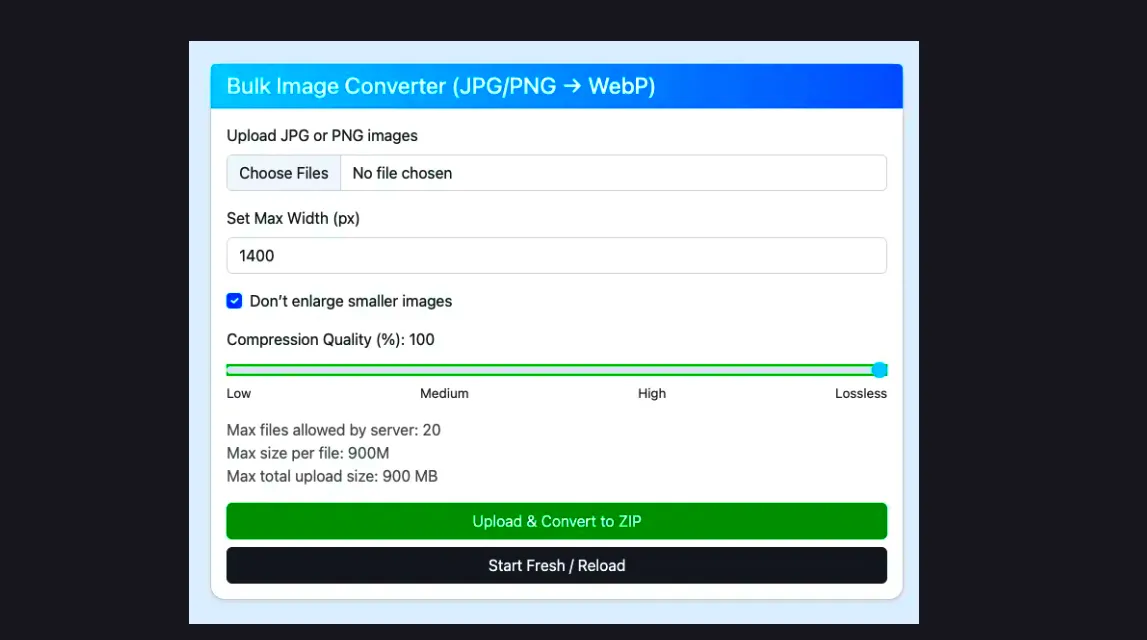
In today’s fast-paced web, optimised images are critical for fast-loading websites and better user experience. Large JPG or PNG files can slow down your site, affect SEO rankings, and increase bandwidth usage. Using PHP, developers can create a bulk image converter that resizes, compresses, and converts images to modern formats like WebP efficiently.
Why Convert Images to WebP?
WebP is a modern image format that provides:
- Smaller file sizes compared to JPEG or PNG
- Maintained visual quality
- Faster page load times
- Improved SEO and better user engagement
PHP Bulk Image Converter Code
Below is a full PHP script that allows bulk uploading of JPG/PNG images, optional resizing, compression, conversion to WebP, automatic cleanup, and ZIP download:
<?php
$uploadDir = 'uploads/';

function phpSizeToBytes($size) {
    $unit = strtoupper(substr($size, -1));
    $bytes = (int)$size;
    switch ($unit) {
        case 'G': $bytes *= 1024;
        case 'M': $bytes *= 1024;
        case 'K': $bytes *= 1024;
    }
    return $bytes;
}

$maxFiles = ini_get('max_file_uploads');
$maxFileSize = ini_get('upload_max_filesize');
$postMaxSize = ini_get('post_max_size');

$postMaxBytes = phpSizeToBytes($postMaxSize);
$uploadMaxBytes = phpSizeToBytes($maxFileSize);
$maxAllowedSizeMB = min($uploadMaxBytes, $postMaxBytes) / 1024 / 1024;

$defaultQuality = 100;

function cleanFolder($dir) {
    if (!is_dir($dir)) return;
    $files = glob($dir . '*');
    foreach ($files as $file) {
        if (is_file($file)) unlink($file);
        if (is_dir($file)) rmdir($file);
    }
}

// Clean uploads folder on every form submission
if ($_SERVER['REQUEST_METHOD'] === 'POST') {
    cleanFolder($uploadDir);
}

$message = "";

if ($_SERVER['REQUEST_METHOD'] === 'POST' && isset($_FILES['images'])) {

    $files = $_FILES['images'];
    $customWidth = intval($_POST['width']);
    $skipSmaller = isset($_POST['skipSmaller']);
    $quality = isset($_POST['quality']) ? intval($_POST['quality']) : $defaultQuality;

    $tmpDir = $uploadDir . 'temp_' . time() . '/';
    $allowedTypes = ['image/jpeg', 'image/png'];

    if (!file_exists($tmpDir)) mkdir($tmpDir, 0777, true);

    $zip = new ZipArchive();
    $zipName = $uploadDir . 'converted_images_' . time() . '.zip';
    $zip->open($zipName, ZipArchive::CREATE);

    for ($i = 0; $i < count($files['name']); $i++) {
        $tmpName = $files['tmp_name'][$i];
        $name = $files['name'][$i];
        $type = $files['type'][$i];

        if (!in_array($type, $allowedTypes)) continue;

        $img = null;
        if ($type == 'image/jpeg') $img = imagecreatefromjpeg($tmpName);
        elseif ($type == 'image/png') $img = imagecreatefrompng($tmpName);

        if (!$img) continue;

        $width = imagesx($img);
        $height = imagesy($img);

        if ($customWidth > 0 && (!$skipSmaller || $width > $customWidth)) {
            $newWidth = $customWidth;
            $newHeight = intval($height * ($newWidth / $width));
        } else {
            $newWidth = $width;
            $newHeight = $height;
        }

        $tmpImg = imagecreatetruecolor($newWidth, $newHeight);
        imagecopyresampled($tmpImg, $img, 0, 0, 0, 0, $newWidth, $newHeight, $width, $height);

        $webpFile = $tmpDir . pathinfo($name, PATHINFO_FILENAME) . '.webp';
        imagewebp($tmpImg, $webpFile, $quality);

        $zip->addFile($webpFile, basename($webpFile));
        imagedestroy($img);
        imagedestroy($tmpImg);
    }

    $zip->close();

    // Cleanup temp folder
    cleanFolder($tmpDir);

    // Offer ZIP download
    header('Content-Type: application/zip');
    header('Content-Disposition: attachment; filename=' . basename($zipName));
    readfile($zipName);

    // Delete ZIP after download
    unlink($zipName);
    exit;
}
?>
Features of This Converter
- Bulk upload multiple images
- Resize images to custom width
- Skip smaller images to avoid enlargement
- Adjust compression from 1% to 100%
- Convert to WebP format
- Download all images in a ZIP file
- Automatic cleanup after conversion
PHP Upload Limits
Check your PHP limits to ensure smooth uploads:
- max_file_uploads: Maximum files allowed per request ()
- upload_max_filesize: Maximum size per file ()
- post_max_size: Maximum total POST size ()
Adjust these in your php.ini if needed.
Conclusion
This PHP bulk image converter helps improve website speed, SEO, and workflow efficiency. With modern UX, automatic cleanup, and full ZIP download, it’s a complete solution for managing multiple images at once.
Frequently Asked Questions
1. What is a bulk image converter in PHP?
A bulk image converter in PHP is a script that allows you to upload multiple images at once and automatically resize, compress, and convert them into a modern format like WebP to optimize website performance.
2. Why should I convert images to WebP?
WebP provides smaller file sizes than JPG or PNG without compromising visual quality. This leads to faster page load times, reduced bandwidth usage, and improved SEO.
3. Can I resize images automatically using PHP?
Yes, PHP allows you to resize images dynamically using functions like imagecopyresampled(). You can set a custom width and maintain the original aspect ratio.
4. How does compression affect image quality?
Compression reduces the file size of images. In PHP, you can adjust the compression level from 1% (highest compression, lower quality) to 100% (lowest compression, highest quality) to balance speed and clarity.
5. Can this converter handle large batches of images?
Yes, the PHP bulk image converter can process multiple JPG or PNG files simultaneously, apply resizing and compression, and export all images as WebP in a single ZIP file.
6. What are PHP upload limits I need to check?
You should check these settings in your php.ini file:
- max_file_uploads: Maximum number of files per request
- upload_max_filesize: Maximum size per file
- post_max_size: Maximum total POST size
Adjust these if you plan to upload large batches of images.
7. Is there an automatic cleanup after conversion?
Yes, the script automatically deletes temporary files and folders after conversion and ZIP download to keep your server storage clean.

